Bank Account Security Checklist: How to Protect Your Accounts from Unauthorized Access
Follow this step-by-step bank account security checklist to guard against unauthorized transactions, phishing, SIM swapping, and account takeover.
In an increasingly digitized financial ecosystem, digital banking security is no longer an optional luxury—it is a mandatory pillar of personal money management. As banking cyberattacks, phishing campaigns, identity theft, and credential stuffing attacks become more sophisticated, securing your bank accounts against unauthorized access is critical.
A single compromised password or intercepted verification code can lead to wiped savings, compromised credit profiles, and months of administrative stress recovering stolen funds.
In this comprehensive, step-by-step Bank Account Security Checklist, we cover the exact technical security protocols, account settings, authentication mechanisms, operational habits, threat vectors, and recovery steps needed to bulletproof your financial accounts against cyber threats.
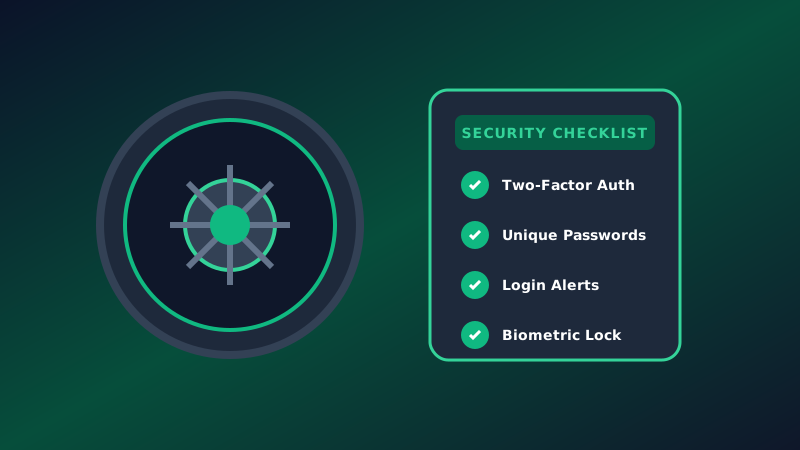
The 10-Point Bank Account Security Checklist
Follow this prioritized 10-point checklist to secure your checking accounts, savings accounts, credit cards, and investment portals.
+-----------------------------------------------------------------------+
|                    BANK SECURITY MASTERY CHECKLIST                    |
+-----------------------------------------------------------------------+
 [x] 1. Unique, High-Entropy Passwords (Password Manager)
 [x] 2. Non-SMS Multi-Factor Authentication (App-Based MFA / Hardware Key)
 [x] 3. Real-Time Transaction and Threshold Alerts
 [x] 4. Biometric Locking on Mobile Devices
 [x] 5. Elimination of Public Wi-Fi Banking (VPN Usage)
 [x] 6. SIM-Swap Protection with Telecom Carrier
 [x] 7. Custom Security Questions (Fictional Answers)
 [x] 8. Debit Card Lock & PIN Management
 [x] 9. Regular Account & Credit Report Audits
 [x] 10. Digital Hygiene & Phishing Awareness
Deep Dive: Master Technical Protocols
1. Implement Unique, High-Entropy Passwords
Never reuse passwords across financial accounts or match your bank password with your primary personal email password. If a non-financial website suffers a data breach, hackers use automated bots to attempt those compromised credentials across thousands of banking portals (a technique known as credential stuffing).
- The Fix: Use an encrypted, audited password manager (such as Bitwarden, 1Password, or Dashlane) to generate unique passwords of 16+ characters containing uppercase letters, lowercase letters, numbers, and symbols.
2. Upgrade Beyond SMS Multi-Factor Authentication (MFA)
While SMS-based Two-Factor Authentication (where a code is texted to your phone) is better than no protection at all, it is vulnerable to SIM-swapping attacks, where a hacker tricks your mobile carrier into transferring your phone number to a hacker-controlled SIM card.
- The Upgrade: Switch your banking MFA to an Authenticator App (such as Google Authenticator, Authy, or YubiKey hardware security keys) whenever supported by your bank. Authenticator apps generate time-based one-time passwords (TOTP) locally on your device without relying on cellular networks.
3. Enable Instant Real-Time Push & Email Alerts
Configure your bank app to send immediate alerts for:
- Any transaction over $1.00
- Any international or online card-not-present transaction
- Any password change, address update, or new device login
- Wire transfers and automated ACH withdrawals
Why Real-Time Alerts Matter: Fraudulent charges often start with a tiny $1.00 test authorization by thieves testing stolen card numbers. Instant alerts allow you to freeze your card immediately before major withdrawals occur.
Operational Security Comparison Matrix
| Security Feature | Weak Protection | Industry Standard | Maximum Security (Recommended) |
|---|---|---|---|
| Password Strategy | Short, remembered password | Long password reused on 2 sites | Unique 20+ character random password stored in Password Manager |
| 2FA / MFA Type | None or Optional | SMS Text Message Codes | App-Based TOTP (Authenticator App) or Hardware Key (YubiKey) |
| Network Access | Public Coffee Shop Wi-Fi | Cellular Data | Encrypted Home Wi-Fi or Secure VPN (Virtual Private Network) |
| Security Answers | Real maiden names/schools | Real information | Random fictional strings stored in Password Manager |
| Card Controls | Unlocked Debit Card | Basic notifications | Card toggled OFF when not actively in use |
Protecting Yourself Against Advanced Financial Phishing
Modern financial scams rarely involve breaking encryption algorithms; instead, they target human psychology through social engineering and phishing campaigns.
PHISHING ATTACK VECTOR:
[ Scammer Spoofs Bank Phone Number ] ---> Calls/Texts You: "Suspicious Activity Detected!"
                                                    |
                                                    v
                                  Asks for 6-Digit MFA Verification Code
                                                    |
                                                    v
[ Victim Shares Code ] ---> [ Scammer Takes Over Account & Drains Balance ]
The Rules of Anti-Phishing Discipline
- Banks Will Never Ask for Your MFA Code: Your bank will never call, text, or email you asking for your one-time verification code, password, or PIN. Anyone asking for this code is an active scammer.
- Beware of Phone Number Spoofing: Scammers can manipulate caller ID displays so their call appears to originate from your bank's official 1-800 phone number.
- Hang Up and Call Back: If you receive a phone call or text message claiming your account has been breached, hang up immediately. Manually dial the customer support number printed on the back of your physical debit card.
Step-by-Step Security Audit Guide
Take 15 minutes today to audit your complete banking environment:
- Log in to your online banking portal. Navigate to Security & Privacy settings.
- Review Connected Devices: Terminate active sessions on old smartphones, laptops, or tablets you no longer own.
- Audit Connected Third-Party Apps: Check which budget apps or fintech tools (via Plaid or Yodlee) have access to your account. Revoke access for any apps you no longer actively use.
- Lock Down Security Questions: If your bank requires security questions (e.g., "What was your first pet's name?"), enter random answers (e.g., "X7#mK9!pQ") and save those answers in your password manager. Real answers can easily be scraped from public social media profiles.
- Contact Your Mobile Provider: Place a Port Freeze / SIM Lock on your cellular account to prevent unauthorized SIM transfers.
What to Do If Your Bank Account Is Compromised
If you discover unauthorized withdrawals or suspicious activity on your account, execute these emergency recovery steps immediately:
- Lock Your Cards via App: Toggle your physical debit and credit cards to "Locked" within your bank's mobile app to stop pending authorizations.
- Change Your Banking Passwords Immediately: Log in from a clean, uncompromised device and reset your password to a new 20+ character random string.
- Contact the Bank's Fraud Department: Call your bank directly and report the specific unauthorized transactions. Under the Electronic Fund Transfer Act (EFTA / Regulation E), your liability for unauthorized debit charges is capped at $50 if reported within 2 business days of discovery.
- File a Police Report & FTC Fraud Report: Obtain an official police incident report number and report identity theft at IdentityTheft.gov.
Frequently Asked Questions (FAQ)
Should I keep my primary savings in a debit-linked account?
It is safest to keep primary emergency savings in a separate account or institution that is not directly linked to a physical debit card. If your physical wallet is stolen, thieves cannot directly access your savings reserves at an ATM.
What should I do immediately if I suspect my bank account was hacked?
First, open your banking app and lock your debit card. Second, change your online banking password immediately. Third, call your bank's emergency fraud department to freeze all outbound transfers and request a new card.
Is banking on a smartphone app safer than using a web browser?
Mobile banking apps on updated iOS or Android devices are generally safer than desktop web browsers because mobile operating systems utilize sandboxing, mandatory biometric authentication, and strict app signature verification.
What is the difference between a soft freeze and closing an account?
A soft card freeze temporarily prevents new card purchases while leaving ACH direct deposits and recurring bills active. Closing an account completely terminates all incoming and outgoing payments.
Editorial Summary & Security Resources
Implementing robust bank security is a simple, high-leverage step that protects your money and peace of mind. By automating strong authentication and staying vigilant against phishing, you eliminate the vast majority of digital vulnerabilities.
Explore related security guides on MoneyTalkin':
- Are Digital Neobanks Safe?
- Digital Financial Safety Guide
- Common Financial Scams & How to Avoid Them
Disclaimer: MoneyTalkin' provides digital security and financial educational guidance for informational purposes only. Always consult your financial institution's official security guidelines for specific account settings and policy rules.
MoneyTalkin' provides financial education, educational concepts, and general informational guides. Articles do not constitute personalized financial, investment, legal, or tax advice. Financial products, rates, terms, and regulatory rules change frequently; consult a qualified financial professional regarding your specific situation. Read our full Disclaimer Policy.
Written by MoneyTalkin'
MoneyTalkin' researches and publishes objective financial education content, money management fundamentals, and practical financial guides.
Related Technical Articles
Explore related topics in this cluster to deepen your understanding.